



May Updates 🌿
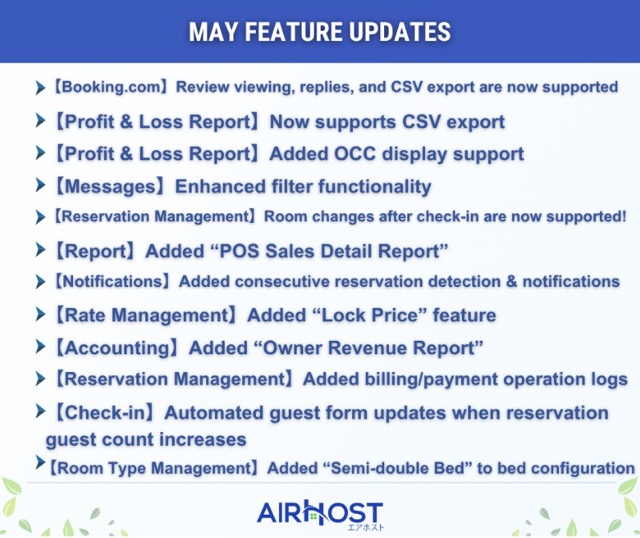
【Booking.com】Review viewing, replies, and CSV export are now supported
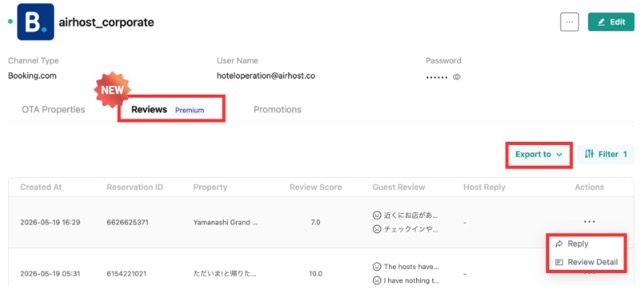
Booking.com review management can now be completed entirely within AirHost! 👏
You can now manage reviews for multiple properties within your account without moving to each Booking.com property management screen. In addition, CSV export and review replies are now supported.
Please check it out from:
Management Console > Channels ✨
※ AirHost ONE HMS Premium plan feature
※ Help page is currently in production.
□■────────────■□■────────────■□■────────────■
【Profit & Loss Report】Now supports CSV export
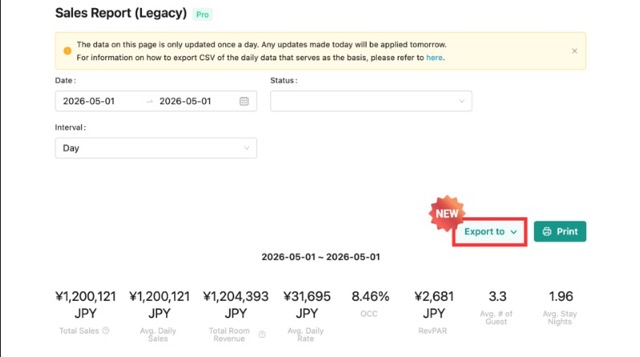
The legacy Profit & Loss Report, which previously only supported viewing and printing, can now be downloaded as a CSV ✨
In addition, exporting up to one year of data across all properties is now supported, making profit analysis and report creation even more efficient!
※ Some export items differ from the “Daily Data” CSV used as the aggregation source.
【Report】Profit & Loss Report (Legacy)
□■────────────■□■────────────■□■────────────■
【Profit & Loss Report】Added OCC display support
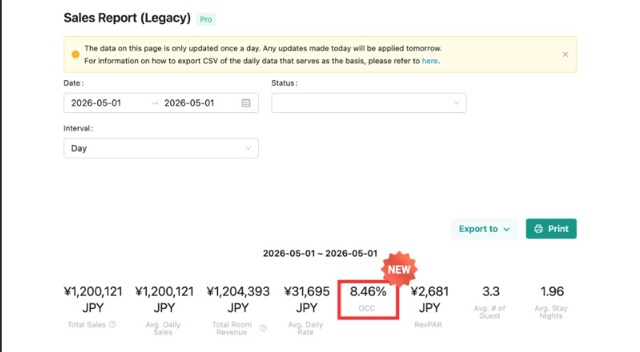
You can now check OCC (Occupancy Rate) within the Profit & Loss Report (Legacy)!
□■────────────■□■────────────■□■────────────■
【Messages】Enhanced filter functionality
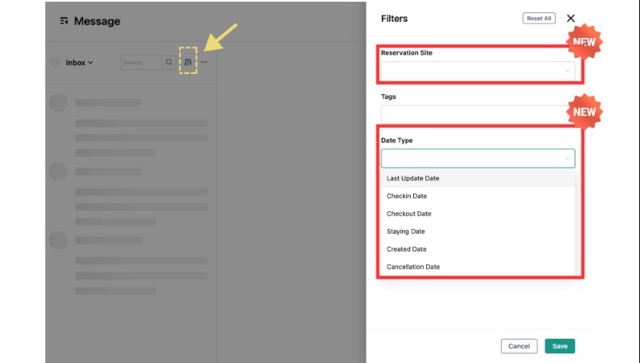
Two new filters — “Booking Site” and “Date Type” — have been added to message management ✨
The following conditions are now available under Date Type:
Last Updated Date
Check-in Date
Check-out Date
Stay Date
Reservation Date
Cancellation Date
You can now find the messages you need more quickly, making daily message management even more convenient!
【Message Management】Overview of Message Management
□■────────────■□■────────────■□■────────────■
【Reservation Management】Room changes after check-in are now supported!
Cases such as room issues, guest requests, or upgrades often require room changes during a guest’s stay at hotel properties.
Previously, room changes were handled by modifying the reservation as a whole, which could create discrepancies between actual room usage and occupancy data shown in calendars and reports.
With this update, room changes during a stay are now supported! 👏✨
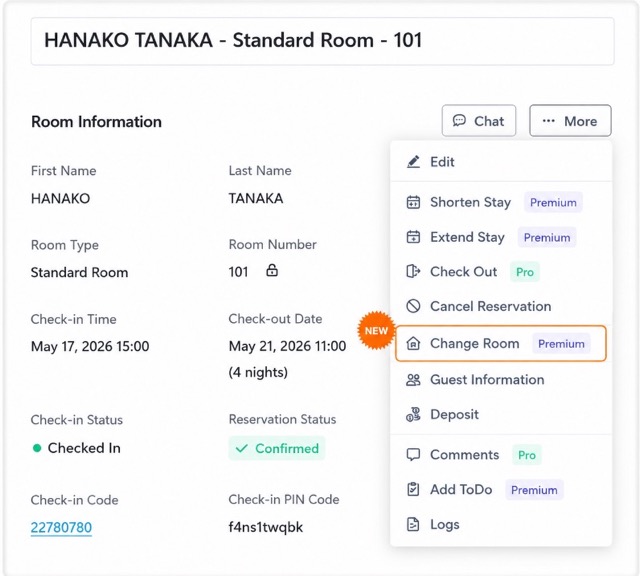
You can also record the reason for the room change and adjust accommodation fees after the change date.
In addition, reservation bars in the reservation calendar are now displayed by room for each stay date, and reports and CSV exports will correctly reflect the actual room used.
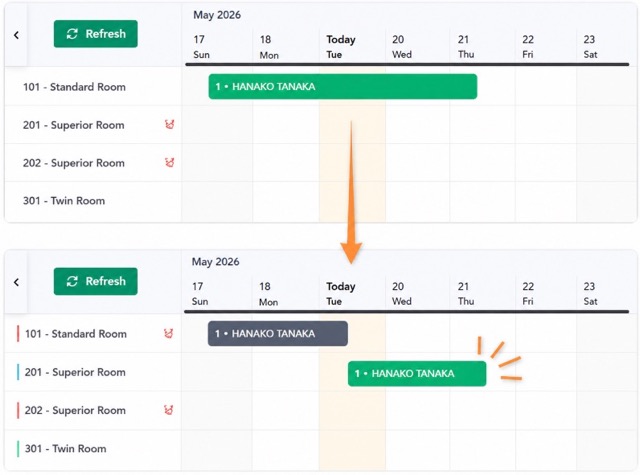
※ AirHost ONE HMS Premium plan feature
※ Help page is currently in production.
□■────────────■□■────────────■□■────────────■
【Report】Added “POS Sales Detail Report”
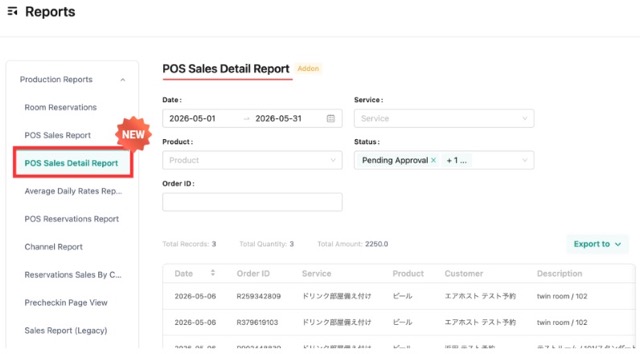
Previously, POS product sales could only be checked on an order/service basis, and you had to open each order detail individually to confirm which products had been sold.
With this update, you can now view and export detailed sales reports including product names and unit prices ✨
This makes it easier to analyze sales performance and best-selling products!
□■────────────■□■────────────■□■────────────■
【Notifications】Added consecutive reservation detection & notifications
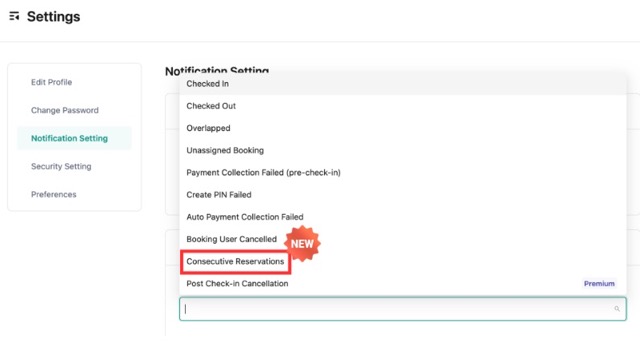
You can now detect and receive notifications for consecutive reservations made by the same guest!
Separate reservations for extending a stay
Combined reservations from different OTAs
Consecutive reservations across different room types
This allows you to identify easily overlooked consecutive stays in advance ✨
This makes it easier to adjust room assignments and cleaning tasks, helping prevent operational mistakes.
Please enable notifications from the settings page!
【Notification Settings】Notification Types
□■────────────■□■────────────■□■────────────■
【Rate Management】Added “Lock Price” feature
We’ve added a feature that allows you to lock configured rates to prevent editing!
![[Pricing Management] How to Use the Price Calendar](http://images.ctfassets.net/q5m53pi41ft0/7nTsHjbLY4WdNPuXH5hev1/98bb9096dab3a1de73b9210a10fd4db0/d2ad8f65-6b9c-46c1-ac97-ed2cd307cfc0.jpeg "[Pricing Management] How to Use the Price Calendar")
You can also save a reason memo when locking rates, making it easier to prevent unintended rate changes by other staff members.
In addition, locked rates will not be overwritten during bulk updates such as applying rate templates or importing rates 👍
This is especially useful when you want to preserve special rates configured for events or peak seasons!
【Rate Management】How to Use the Rate Calendar
□■────────────■□■────────────■□■────────────■
【Accounting】Added “Owner Revenue Report”
We’ve added a revenue reporting feature for property owners!
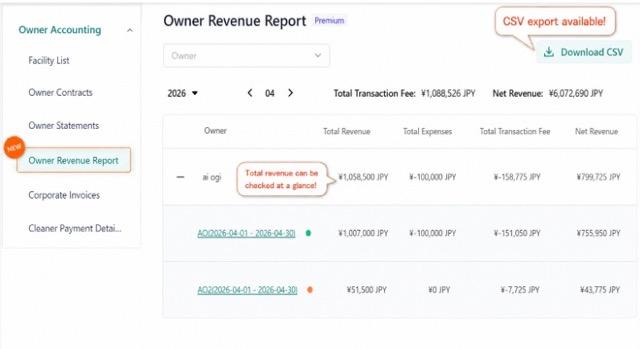
You can now check monthly revenue and also view total revenue across multiple properties ✨
CSV download is also supported, making owner reporting and aggregation tasks more efficient.
□■────────────■□■────────────■□■────────────■
【Reservation Management】Added billing/payment operation logs
A new “Log” menu has been added to transaction details within reservation details!
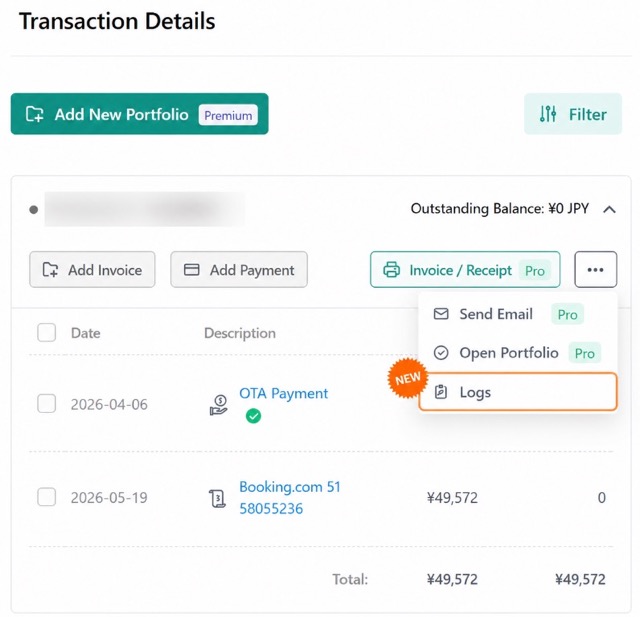
Previously, there was no way to check the history of billing and payment-related operations. With this update, you can now see who performed actions such as product purchases, manual billing additions, and payment operations, and when they were performed ✨
□■────────────■□■────────────■□■────────────■
【Check-in】Automated guest form updates when reservation guest count increases
Guest forms are now automatically updated when the reservation guest count increases!
Previously, if a reservation changed from 2 guests to 3 guests, the guest form would not update automatically and staff had to manually add the additional guest.
With this update, guest forms are automatically added when the number of guests increases, helping reduce missing entries and operational workload 😊
※ When the guest count decreases, guest forms still need to be adjusted manually.
【Check-in Management】How to View / Edit / Add / Delete Guest Forms Submitted by Guests
□■────────────■□■────────────■□■────────────■
【Room Type Management】Added “Semi-double Bed” to bed configuration
“Semi-double Bed” has been added to the bed configuration settings for room types!
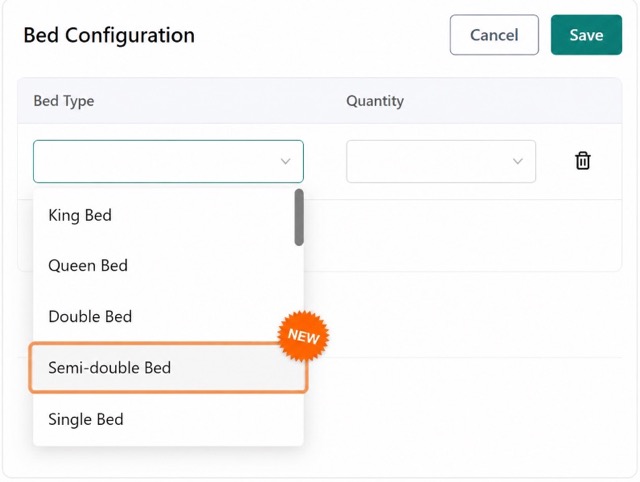
You can now configure room settings more accurately based on the actual bed setup of your property ✨
□■────────────■□■────────────■□■────────────■
That concludes the May 2026 update information 😉
AirHost will continue improving to help make your operations smoother.
Thank you for your continued support 🍀
As the weather gradually gets warmer, please take good care of yourselves and stay healthy 🌿